
iPhone Duo and iOS 27: A Developer's Read on Apple's Event
Apple announced the iPhone Duo, iPhone 18 Pro and an iOS 27 date. Notes from five years of shipping iOS apps on what adaptive layout actually demands now.
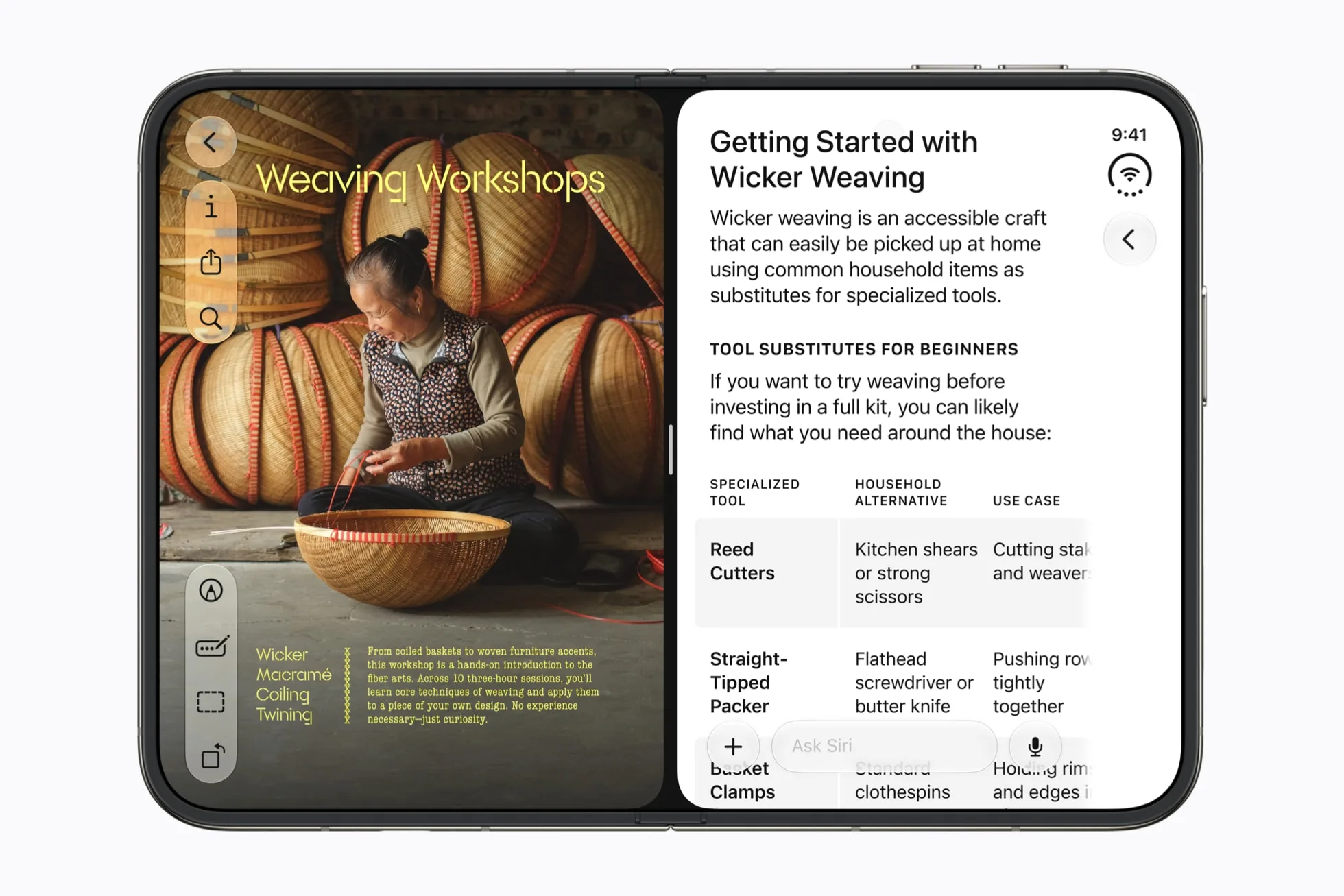
Apple shipped the foldable last night. Most of the coverage is about the hinge. The part I keep thinking about is that a chunk of the App Store is going to look wrong on a device people paid two thousand dollars for, and that Apple quietly put two apps side by side on an iPhone for the first time.
I've been shipping iOS apps for about six years, all of them assuming one screen. That assumption expires on 23 October.
What Apple announced, in one paragraph
The iPhone Duo is a book-style foldable with a 5.4-inch outer display and a 7.6-inch inner one, an under-display front camera, Touch ID instead of Face ID, $1,999 in the US and ₹2,99,900 in India, shipping 23 October. The iPhone 18 Pro and Pro Max get the A20 Pro and a variable-aperture 48MP main camera, on sale 18 September. There's no base iPhone 18 until spring 2027. And iOS 27 ships Monday, 14 September, for iPhone 11 and newer.
That last date is the one that goes in your calendar. Full recap and the India pricing worked out properly is in iPhone Duo India price and everything Apple announced. The rest of this is the developer side.
The part that matters if you ship apps
Apple has been telling us this was coming since June. Just not in words.
At WWDC the Platforms State of the Union asked developers to stop designing for fixed screen sizes and start designing for a dynamic range of sizes and aspect ratios. Then people went through the iOS 27 beta frameworks and found foldState, angleDegrees, mechanicalAngleDegrees, and a function for counting a device's built-in displays. None of that was in iOS 26.
Three months of notice, if you were reading. Here's what actually lands on you.
1. Split View, which is the real news
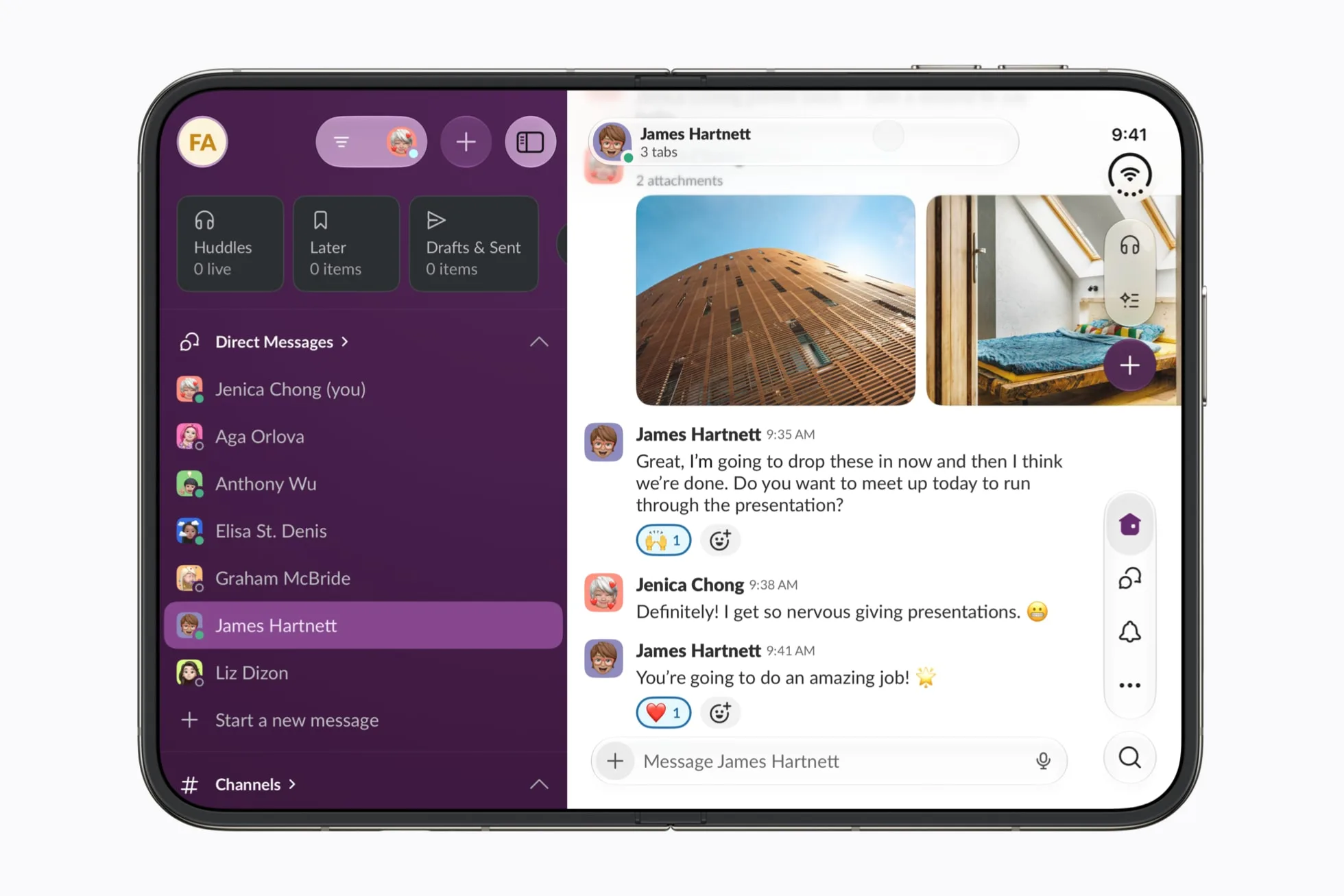
Buried in Apple's own release: Split View puts two apps side by side on an iPhone for the first time.
Everyone is writing about the hinge. This is the bigger change. Your app is no longer guaranteed the full width of anything. It can be sharing a 7.6-inch screen with Safari, at a width nobody has ever run it at, next to an app that has no idea it exists. iPad developers have lived with this since 2015 and iPhone-only developers have never had to think about it once.
If your app has ever assumed that width equals device width, that assumption dies on 23 October.
2. The transition, not the endpoints
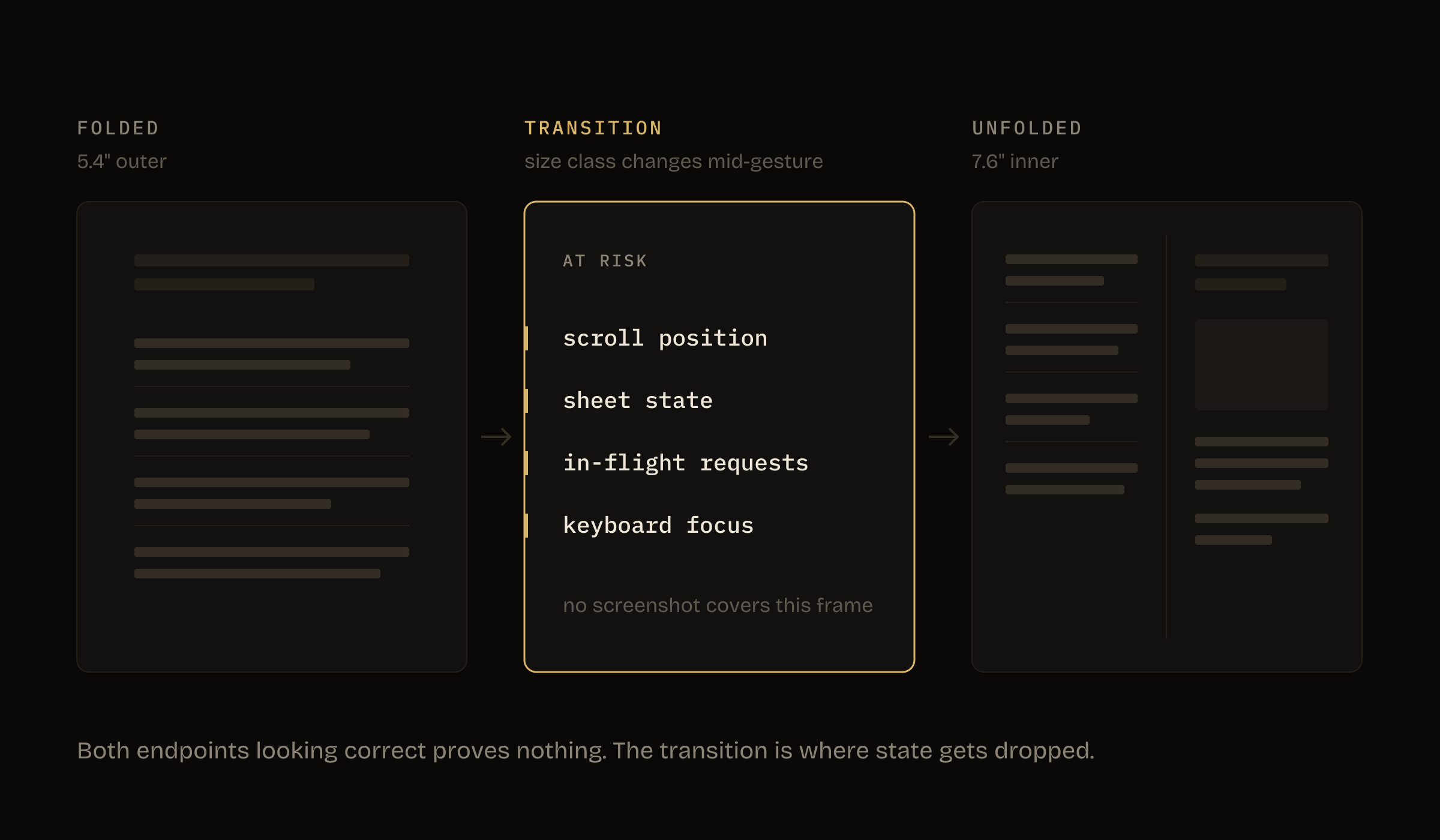
The layouts mostly survive. SwiftUI with sensible constraints handles a wider canvas without much drama. What breaks is the moment in between.
Someone is scrolling a list on the outer screen, they open the device, and your app has to survive a size class change mid-gesture without losing scroll position, without dismissing the sheet that was already up, without re-firing the request that was already in flight, and without dumping the half-typed text in the field that had keyboard focus a quarter of a second ago. Same problem in reverse when they fold it back. Rotation taught us a version of this and most of us learned it badly, because rotation is a slow deliberate thing you do with two hands and unfolding is not. I've been through my own apps looking for this and the honest finding is that the code that handles it badly is never the layout code. It's the view model that reloads on onAppear. It's the sheet presented off a boolean that gets reset. It's the scroll position I never bothered to restore, because in six years nobody has ever needed me to.
3. Everything that assumed one screen
Video players, camera UIs, anything doing custom drawing sized off UIScreen.main.bounds. That was always the wrong call. Now it has a price attached, and the price is a screenshot of your app looking broken on a three lakh phone.
4. Orientation locks
Apple says multitasking on the Duo works in any orientation, including partially folded. A portrait lock is going to feel broken on a device the size of an iPad mini, and half of us set one years ago out of laziness rather than a reason.
| What you have | What happens on the Duo | Fix |
|---|---|---|
UIScreen.main.bounds for sizing | Wrong on both screens, and wrong again in Split View | Read the view's own size |
Hardcoded "Face ID" string | Wrong on every Duo | LAContext.biometryType |
| Portrait orientation lock | Feels broken on a 7.6-inch screen | Unlock it unless you have a reason |
Reload on onAppear | Re-fetches every time the device is folded | Move it to a lifecycle that isn't the layout |
| Fixed-width toolbars | Overflow at narrow Split View widths | visibilityPriority, added in iOS 27 |
Apple's adaptive layout guidance in the Human Interface Guidelines is worth twenty minutes if you've never read it properly. Most of us never did, because until now there was one screen size that mattered.
Touch ID coming back is a bigger deal than it looks
Face ID has been the default authentication assumption in iOS apps since 2017. If you've written biometric auth in the last five years, there's a decent chance you have a string somewhere that says 'Face ID'. In a permission prompt, an onboarding screen, a settings toggle, an error state.
On the Duo that string is wrong.
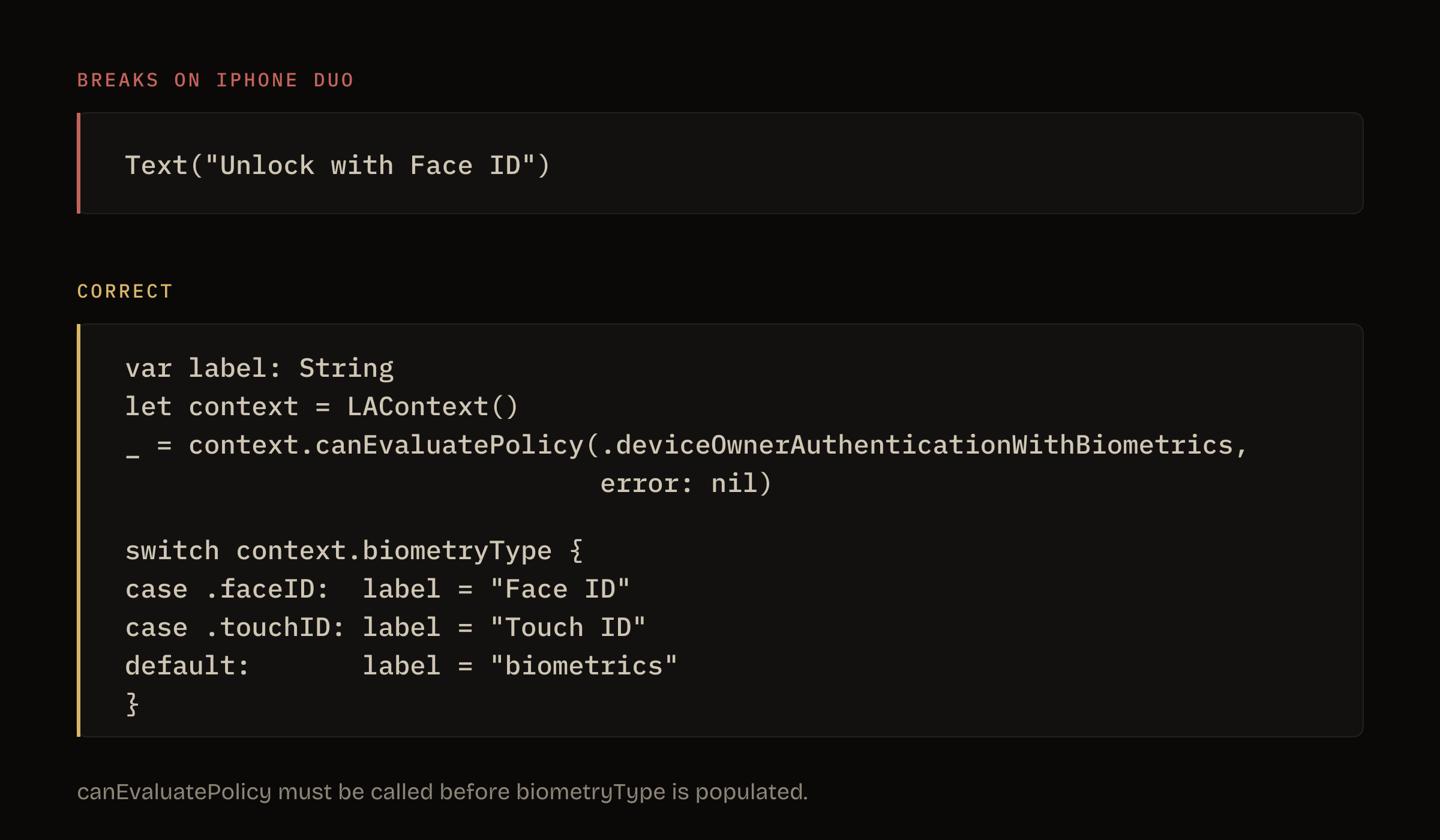
LAContext.biometryType has always been the correct way to check. Most of us have been sloppy about it because there was only one right answer for years. That changes on 23 October.
var label: String
let context = LAContext()
_ = context.canEvaluatePolicy(.deviceOwnerAuthenticationWithBiometrics,
                              error: nil)

switch context.biometryType {
case .faceID:  label = "Face ID"
case .touchID: label = "Touch ID"
default:       label = "biometrics"
}
canEvaluatePolicy has to be called before biometryType is populated, which is the part people miss. The default branch covers whatever Apple adds next, so this doesn't need revisiting.
Fifteen minutes. The alternative is a one-star review from someone who paid two thousand dollars and was told to look at a phone that doesn't want their face.
The India pricing reality
The Duo is ₹2,99,900 here against $1,999 in the US, which works out at ₹150 for every dollar of US list price. The 18 Pro is ₹138 and last year's 17 Pro was ₹123. I've done that arithmetic properly in the pricing post, because it deserves its own page.
What matters for building is narrower. The Indian install base that will own a Duo in the first year is small enough to be a rounding error, and the devices we should optimise for are still several generations behind the flagship. But it does mean the first foldable users your app meets are almost certainly not in India. They're in markets that pay more, on a device that cost them two thousand dollars. If you sell subscriptions, that's the cohort worth not embarrassing yourself in front of.
What I'm changing in my own apps this month
Concretely, in rough order:
- Audit for fixed dimensions. Grep for
UIScreen.main.bounds, hardcoded widths, and any frame set in points that should be relative. This is the boring one and it finds the most. - Test the transition, not the endpoints. Both layouts looking fine in a screenshot proves nothing. Run the size class change while a sheet is open, while a keyboard is up, mid-scroll. That's where state gets dropped.
- Fix biometric strings. Read
biometryType, remove every hardcoded 'Face ID'. - Unlock orientation anywhere I locked it out of laziness rather than a real reason.
- Pick two screens to actually design for the wide layout, not just survive it. For most apps that's the main list and the detail view. A two-column layout on a 7.6-inch screen is a better app, not just a non-broken one.
- Ship before 23 October. Review takes what it takes, and being in the store on day one of a new form factor is worth more attention than the same update in November.
What I'll be watching
Whether the Duo sells. Apple pricing it at $1,999 rather than higher suggests they want volume, not a halo device. If it moves, foldable support stops being optional in about eighteen months.
Whether the crease holds up. I haven't held one, so I don't know, and no keynote was ever going to tell me.
And whether Apple ships proper foldable-specific APIs at WWDC 2027 or leaves us with the adaptive-layout story. The foldState references suggest more is coming.
For now, 14 September is the date that matters. iOS 27 lands, your users update within days, and whatever your app does on a resizing window is what they'll see.
FAQ
Do I need to update my iOS app for the iPhone Duo?
If your layout uses fixed widths or assumes a single screen size, yes. Apps built with adaptive constraints and SwiftUI layout primitives will mostly work, but transitions between the folded and unfolded state need testing.
When does iOS 27 release?
Monday, 14 September 2026, for iPhone 11 and newer.
What are the iPhone Duo screen sizes?
A 5.4-inch outer display and a 7.6-inch inner Super Retina XDR display, which Apple says is about 50 percent larger than the iPhone 18 Pro Max screen.
Does the iPhone Duo have Face ID?
No. It uses Touch ID built into the side button, so any hardcoded 'Face ID' string in your app will be wrong on that device.
How do I test my app on the iPhone Duo before it ships?
Xcode's simulator in iOS 27 can resize across aspect ratios, and the resizing inspector flags layout problems. Test the transition between states while a sheet is open and mid-scroll, not just the two endpoints.
Do I need to handle foldState and angleDegrees directly?
For most apps, no. Adaptive layout and correct size class handling cover it. The fold APIs matter if you want a specific layout at a specific hinge angle.
Sources: Apple Newsroom on iPhone Duo, the WWDC26 Platforms State of the Union, and the Apple India store. Product photography by Apple.
I build iOS apps from Surat. ShotPop and the rest of them are all getting this treatment over the next six weeks. If you're working through foldable adaptation and want to compare notes, get in touch or use the brief form on the front page.

Product builder from Surat. Ships his own apps, runs live broadcasts, and takes on a few founders a year for product, brand and growth. hey@jaybutani.com