
Meta Blocked Apple Intelligence in WhatsApp and Instagram. iOS 27 Puts It on the Keyboard. Does That Beat the Block?
Writing Tools has been switched off inside every Meta app since April 2025. iOS 27, out 14 September, moves it into the keyboard as Write with Siri. Whether that gets past Meta's opt-out is the open question, and this post tests it on day one.
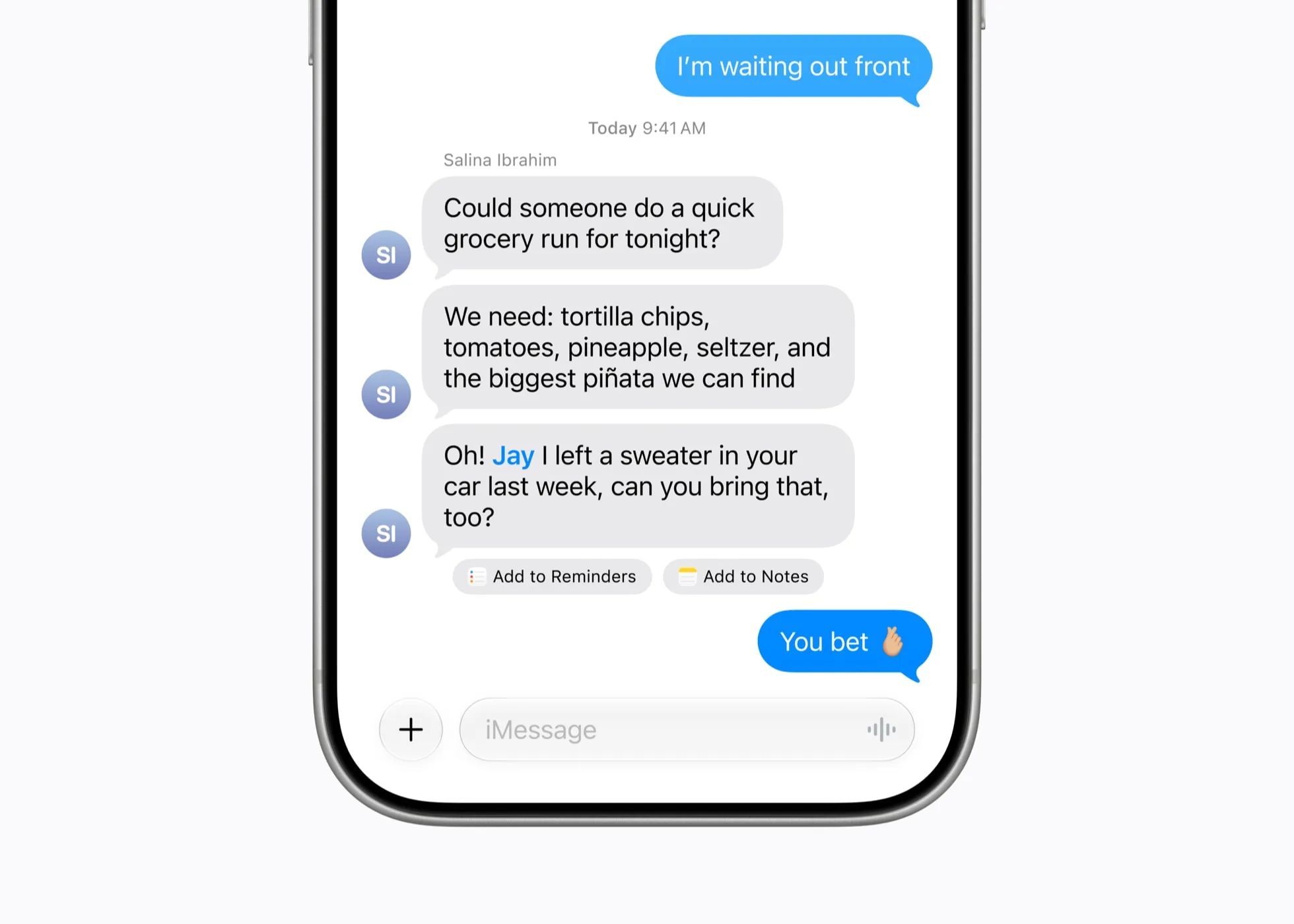
Apple Intelligence's Writing Tools does not work inside WhatsApp, Instagram, Facebook, Messenger or Threads on an iPhone. It has not since April 2025. Meta turned it off, on purpose, using a switch Apple built for developers, and has never said why.
On 14 September iOS 27 shipped. It removes the Writing Tools panel entirely and replaces it with Write with Siri, a button that lives in the keyboard's suggestion bar rather than in the app. That changes the shape of the question. Meta could opt its text boxes out of a feature that lived in the text box. The keyboard is Apple's. Whether a keyboard-level Write with Siri appears and works inside a Meta app is not something anyone had published before release. This post tests all five Meta apps on the public release; the results table and changelog are at the foot of the page. One complication that surfaced on launch day: the new Siri AI is in beta behind a waitlist, so a phone on iOS 27 does not necessarily have the new Siri yet. Which keyboard features that gates is covered below.
Until then, here is what can be established about what was blocked, how, why it matters more in India than almost anywhere, and whether Apple should make its own writing tools mandatory on its own phone. Checked again on 13 September 2026 on iOS 26, the day before the update: still blocked in all five apps.
What Meta turned off, and when
The reporting landed on 17 April 2025. AppleInsider, MacRumors and iDownloadBlog all confirmed the same thing: Writing Tools, the Apple Intelligence feature that proofreads, rewrites and summarises text in any text field, was unavailable across Facebook, Instagram, Threads, WhatsApp and Messenger on iOS and iPadOS. The removal appears to have started in December 2024 and was complete by spring.
Genmoji went with it. Apple's generated emoji could previously be dropped into Instagram as stickers. That stopped too; Instagram now only offers its own sticker set.
Meta has not explained the decision. Every outlet that covered it reached the same conclusion, and it is the only one that fits: Meta AI was being pushed into the same apps at the same time, and a competing writing assistant sitting one tap away in the compose box was not part of the plan. It remains a guess, because Meta has never confirmed it.
One detail that matters for the rest of this post: the block is app-level, not account-level. Open WhatsApp Web, Instagram or Facebook in Safari on the same iPhone and Writing Tools works fine, because Safari's text fields are Apple's. Meta blocked the feature in the code it ships, not in the service it runs.
This is an opt-out Apple built
It would be easy to write this as Meta hacking around Apple. It is the opposite. Apple designed Writing Tools so that any app using the standard text views gets it automatically, and then gave developers a one-line way to turn it off.
The property is writingToolsBehavior. Apple's documentation lists three settings: .complete for the full inline experience, .limited for a panel that suggests but does not rewrite in place, and .none, which removes Writing Tools from that text view entirely. Apple's own guidance for .none is that it is for fields where a rewrite would be wrong: passwords, code, anything that must be typed exactly. A chat box is not on that list. Meta put it there anyway.
Apps with genuinely custom text engines, the kind that draw their own text rather than using Apple's, have a separate path called UIWritingToolsCoordinator that lets them plug in. That is a chunk of work, and an app that does not do it also ends up without Writing Tools, by omission rather than decision. It is not possible to tell from the outside which of the two Meta's apps are. The effect on the user is the same: select text, look for the option, it is not there.
So the honest framing is this. Apple shipped a feature with an off switch. Meta, the developer with more iPhone users than any other, flipped it. Apple's rules allowed it. The question is not whether Meta broke a rule. It is whether the rule is right.
Why this lands harder in India
WhatsApp passed three billion monthly users in April 2025, on Meta's own numbers. India is its largest market by a distance, and also the largest market for Meta AI usage. For a very large share of iPhone owners here, WhatsApp is not one app among many. It is where work messages, family, customer support, invoices, school groups, and half of all business correspondence happen. Instagram is where the other half of small business happens. The compose box in those two apps is, for most Indian phone users, the most-typed-in text field on the device.
Now price the phone. Apple Intelligence needs an iPhone 15 Pro or newer. The cheapest new iPhone this month is the 18 Pro at ₹1,64,900, and a large part of what Apple sells that phone on is the intelligence layer: proofread this, make it sound professional, summarise that. Those are real, daily, useful things. Writing Tools is one of the few Apple Intelligence features that earns its keep without any setup, because it meets you in the text box you were already typing in.
Except in the text box you type in most. A person in Surat who spends a lakh and a half on a phone, opens WhatsApp to reply to a client, and finds the feature the phone was advertised on is not there, has a reasonable complaint. It is not with the hardware. It is with a decision made in Menlo Park that Apple's rules permit and Apple's marketing does not mention.
Meta's alternative is Meta AI, which is present in the same apps and will happily rewrite a message for you. It is not the same thing. It is a chatbot you paste into, not a tool that reads what you selected. And it is Meta's model, on Meta's servers, with Meta's terms, which is precisely the trade Apple Intelligence was built to let you avoid.
What iOS 27 changes
iOS 27 beta 2, on 22 June, replaced the Writing Tools panel with Write with Siri. The old approach was: select text, open the edit menu, tap Writing Tools, pick Proofread or Rewrite or a tone. The new approach puts a Siri button in the keyboard's suggestion bar. When a text field is empty it sits there as a prompt before you type a word; once you start typing it shrinks to a smaller button next to the predictive suggestions. You tap it, or just speak, and ask for what you want in plain language: fix this, make it shorter, make it sound like me.
Apple's own release notes, published on 9 September, say Write with Siri works virtually anywhere you type. 9to5Mac's hands-on was more specific: in an app like Notes, or most apps that use the standard system text components. Virtually. Most. Not all. Nothing published so far says what happens in an app that set its text view to .none. And .none has not gone anywhere: as of 13 September Apple's documentation lists UIWritingToolsBehavior.none as available from iOS 18 onward with no deprecation note, so Meta's switch is still a valid switch on iOS 27. The button lives in the keyboard, which is system UI. The text it would act on lives in the app's text view, which is the app's. Which of those wins is an implementation detail Apple has not documented publicly, and a detail with several hundred million Indian users on one side of it.
Two smaller facts from the beta cycle. First, there is no dedicated toggle to hide Write with Siri; the only user-side switch is buried in Screen Time under Content & Privacy Restrictions, Siri, Writing Assistance. Apple wants this button in front of you. Second, Apple has said automatic proofreading is coming, surfacing spelling and grammar suggestions as you type across the system. That is keyboard-level too. The direction is clear: Apple is moving the writing layer out of the app and into the input method.
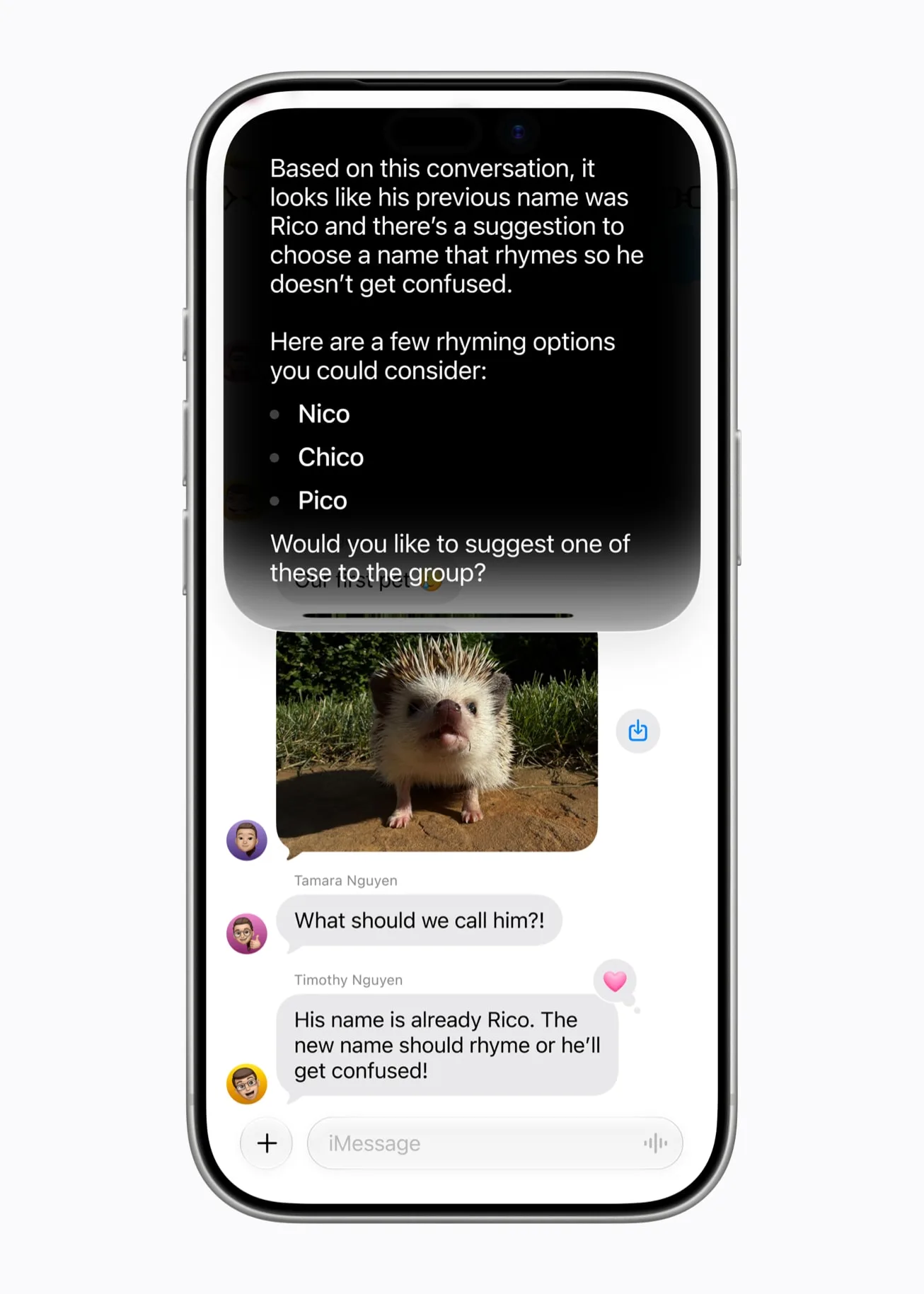
Which is the right place for it. If the tool belongs to the keyboard, the app should not get a vote. Dictation already works this way: tap the mic in any app and Apple's speech model inserts text into whatever field is focused, and no developer opt-out exists for that. Write with Siri, in principle, is dictation that can also read.
The day-one test, 14 September
Five apps, three operations each, on an iPhone running the public iOS 27 release, not a beta. Every result is screenshotted and the table below is filled in as the checks complete. A wrinkle Apple did not flag before launch: Siri AI ships as an opt-in beta with a waitlist, because each device has to download more than 10GB of model data first. Until a phone is through that queue it is on iOS 27 without the new Siri, and whether Write with Siri appears at all in that state is one of the things the table records.
| App | Write with Siri button visible in the keyboard? | Generate into an empty field | Proofread typed text | Rewrite selected text |
|---|---|---|---|---|
| Pending | Pending | Pending | Pending | |
| Instagram (DM and caption) | Pending | Pending | Pending | Pending |
| Facebook (post and comment) | Pending | Pending | Pending | Pending |
| Messenger | Pending | Pending | Pending | Pending |
| Threads | Pending | Pending | Pending | Pending |
| Notes (control) | Pending | Pending | Pending | Pending |
There are three possible outcomes and each one is a different story. If the button appears and works in all five, Meta's opt-out is dead and this post becomes a record of the two years it was alive. If the button appears but does nothing, or inserts text without being able to read what is there, Apple has half-solved it and the interesting question becomes whether that half is enough. If the button does not appear at all in Meta's apps, then .none still wins, the keyboard is not really the keyboard, and the argument in the next section is the only thing left.
Should Apple make it compulsory?
The case for yes is strong. The strongest version of the case against is not stupid either, so both are laid out before the verdict.
The case for. The keyboard is Apple's surface. Tap the mic and Apple's model transcribes into any app, and nobody argues that WhatsApp should be able to refuse. A writing assistant that reads the field and offers a rewrite is the same category of thing: an input method, not an app feature. The user chose the phone, paid for the model that runs on it, and is typing on Apple's keyboard. The app is a destination for the text, not the owner of the act of writing it. On that reading, .none should exist only for the cases Apple itself listed, passwords and exact-text fields, and a general-purpose chat box should not qualify.
The case against, made properly. .none exists because there are text fields where a system rewrite is genuinely harmful, and Apple cannot know from the outside which fields those are; only the developer can. A code editor, a field that takes a tracking number, a form where a bank wants the exact string. Take away the switch and you break those. Narrow it to a stated-reason model and you have Apple adjudicating developers' reasons, which is a new kind of App Review, and App Review is already the thing regulators are most interested in. Apple is in the middle of a dispute with Meta under the EU's Digital Markets Act, in which Apple says Meta has filed fifteen interoperability requests seeking deep access to iOS and Meta says Apple hides behind privacy every time it is caught being anti-competitive. An Apple that forces its AI into Meta's compose box is an Apple that has handed Meta its next filing. And there is a plainer point: it is Meta's app. If Meta wants to ship a worse app, that is Meta's right, and the user's remedy is a different app.
Where this lands. The second argument is right about the mechanism and wrong about the scale. Passwords and tracking numbers are a handful of fields. The compose box in WhatsApp is the most-used text field in the country. Treating them the same, one switch for both, is a category error that Apple wrote into the API and Meta exploited. The fix is not to remove .none. It is to move the tool somewhere the switch does not reach, which is what iOS 27 appears to be doing, and then to be explicit about it: a keyboard-level assistant that works everywhere the keyboard does, with the developer able to mark specific fields as exact-text, and nothing else. That is not Apple forcing its AI into Meta's app. It is Apple declining to let Meta reach into Apple's keyboard. If the day-one test shows Write with Siri is blocked in WhatsApp, that is the line Apple should draw, publicly, and before iOS 28.
And the user's remedy being a different app is true everywhere except here. There is no different WhatsApp. That is the whole reason this matters.
What to do today
Until the test says otherwise, these are the workarounds that actually work, ordered by how little they interrupt you.
- Use the web version for anything that matters. WhatsApp Web, Instagram and Facebook in Safari all get Writing Tools, because the text field is Safari's. Slow for a quick reply, fine for a caption or a long message you want to get right.
- Draft in Notes, paste in. Writing Tools works in Notes. Write the message there, proofread or rewrite it, copy, paste into WhatsApp. Two extra taps. This is what most people end up doing without thinking of it as a workaround.
- A third-party keyboard with its own rewrite. Several exist. They see your text through the keyboard extension API and run their own model, usually in the cloud. That works in Meta's apps because, again, the keyboard is not the app. Read the privacy policy before you type anything private into one.
- Update to iOS 27, join the Siri AI waitlist, and check the keyboard. If the Siri button turns up in the suggestion bar inside WhatsApp, the rest of this list is history.
Where this goes
Two companies, each with a reasonable claim on the text box, and neither has said a public word about the other's position. Meta has not explained the block. Apple has not said whether the keyboard beats it. The phone costs a lakh and a half and the user is the one finding out by trial. The table above is filled in on the 14th, and if the block survives, this post is updated every time either company moves.
Jay Butani builds iOS apps from Surat and writes about what shipping on Apple's platform actually costs; the day-to-day is on X. If you run the same test on your own phone and get a different result, reply there. The table gets corrected, not defended.
FAQ
Why does Writing Tools not work in WhatsApp on my iPhone?
Because Meta disabled it. Since April 2025 the iOS apps for WhatsApp, Instagram, Facebook, Messenger and Threads have opted out of Apple Intelligence Writing Tools using Apple's developer setting. It is not a bug on your phone and not a region restriction. Writing Tools works in the same apps' web versions in Safari.
Does Apple Intelligence work in Instagram?
Writing Tools and Genmoji stickers do not work in the Instagram iOS app as of iOS 26. Meta removed support in early 2025. Genmoji can no longer be used as Instagram stickers; only Instagram's own stickers are available. The web version in Safari still supports Writing Tools.
Will Write with Siri in iOS 27 work in WhatsApp?
Unknown as of 13 September 2026. Write with Siri lives in the keyboard's suggestion bar and works in apps that use standard system text components. Nobody has published a result for Meta's apps, which opted out of the previous Writing Tools. All five Meta apps are tested on the public iOS 27 release on 14 September and the result is posted in this article's changelog.
Can I force Writing Tools to work in an app that blocked it?
Not directly. Workarounds: use the app's web version in Safari, draft in Notes and paste, or use a third-party keyboard that has its own rewrite feature. Third-party keyboards run their own models, so check their privacy policy first.
Why did Meta block Apple Intelligence?
Meta has never said. The block coincided with Meta AI being added to the same apps, and every outlet that covered it concluded Meta wanted its own assistant to be the one users reach for. Apple's developer API allows any app to opt out, so no rule was broken.
How do I turn off Write with Siri on the iOS 27 keyboard?
There is no direct toggle. Go to Settings, Screen Time, Content & Privacy Restrictions, Siri, Writing Assistance, and set it to Don't Allow. That removes the button from the keyboard.
Sources: AppleInsider, MacRumors and iDownloadBlog, 17 April 2025, on the block. Apple developer documentation for UIWritingToolsBehavior.none and UIWritingToolsCoordinator. 9to5Mac, 22 June 2026, on Write with Siri in iOS 27 beta 2; iDownloadBlog, 19 August 2026, on hiding it; MacRumors, 18 May 2026, on automatic proofreading. TechCrunch on WhatsApp's three billion users and TechCrunch on India and Meta AI. Engadget on the Apple and Meta DMA dispute. iPhone 18 Pro India pricing from my own post on the September event.
- 15 Sep 2026
- iOS 27 shipped on the 14th. Siri AI is an opt-in beta with a waitlist at launch, which the post now notes. Table results follow once the test phone is through the waitlist.
- 13 Sep 2026
- Published, one day before iOS 27. Re-checked on iOS 26 the same day: Writing Tools still absent in WhatsApp, Instagram, Facebook, Messenger and Threads. Test table pending.

Product builder from Surat. Ships his own apps, runs live broadcasts, and takes on a few founders a year for product, brand and growth. hey@jaybutani.com